Client credit
Client credit is a prepaid balance held on a client's account that you can later apply against one of their invoices instead of capturing a fresh payment. It's useful for retainer arrangements, deposits, refunds you'd rather keep on file than refund out, or anywhere you take money before a specific invoice exists.
Every client has exactly one credit balance, denominated in the client's currency.
Where it lives
Open any client's view page (/clients/view/{id}) and look for the Credit Balance card sitting below the financial metrics row:

The card always shows the client's current balance — $0.00 (or the equivalent in the client's currency) when no credit has been added.
Adding credit
Click + Add Credit on the card to open the modal:
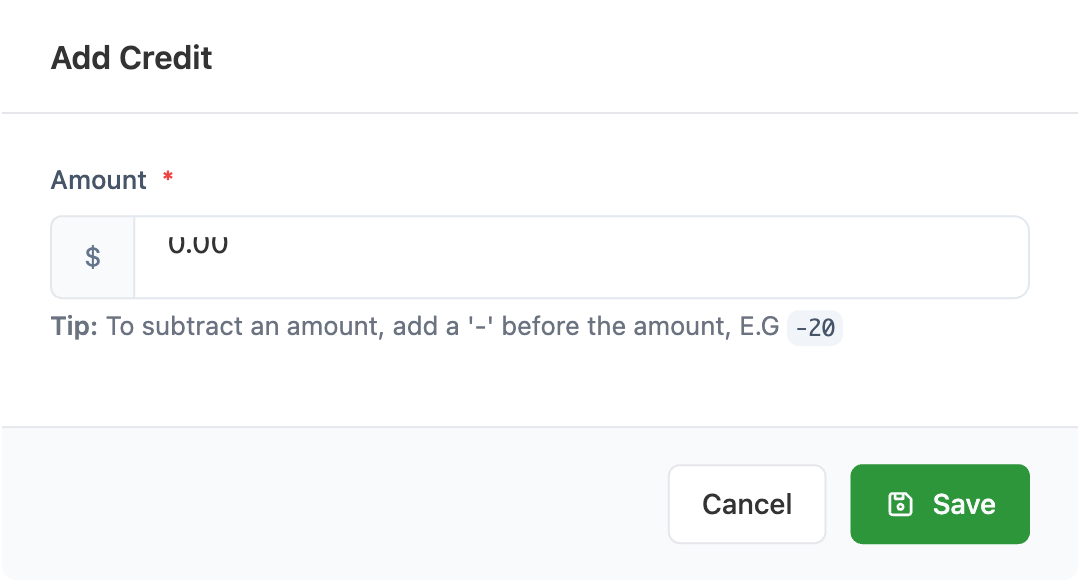
Amount(required) — the amount to add to the balance. The currency symbol shown is the client's currency.- The tip below the field reads:
To subtract an amount, add a '-' before the amount, E.G -20.
Click Save. The modal closes and the Credit Balance card updates immediately to show the new total.
Deducting credit
Use the same + Add Credit modal. Type a negative number — -20 to remove 20 from the balance, for example.
SolidInvoice does not stop you from going below zero this way. If you enter a deduction larger than the current balance, the resulting balance will be negative. There is no separate "deduct" form — negative amounts are the only way to reduce credit manually.
Applying credit to an invoice
Credit is applied at payment time, not automatically when an invoice is created. To pay an invoice using a client's credit balance:
- Open the invoice you want to settle.
- Click
Pay. - On the payment form, choose
Creditas the payment method. - Enter the amount to pay (up to the smaller of the invoice balance and the available credit) and confirm.
When the payment captures, the client's credit balance is automatically reduced by the payment amount, and the invoice's balance moves toward Paid like any other payment.
You don't have to use the entire credit balance on a single invoice — pay a portion, leave the rest on the account, and apply it later. Likewise, an invoice can be partly paid with credit and partly paid via another method (Stripe, PayPal, manual cash, etc.) using two payment entries.
If the amount entered exceeds either limit:
- More than the available credit → SolidInvoice rejects the payment with
Not enough credit available on this client's account. - More than the invoice balance → SolidInvoice rejects the payment with
Amount exceeds invoice balance.
Tracking credit history
The credit balance is a single rolling number. SolidInvoice does not currently store a history of every adjustment — you can see what the balance is now, but not every time it changed.
If you need an audit trail, record each adjustment in your accounting system or in the client's notes externally. Two indirect signals exist inside SolidInvoice:
- Payments using credit — every time credit is applied to an invoice, a
Paymentrow is created with methodCredit. These are visible on the client'sPaymentstab and contribute toTotal Income. - Manual adjustments (the
+ Add Creditmodal) leave no per-transaction record beyond the resulting balance.
When to use credit vs other tools
Credit is the right tool when you've already received the money but haven't matched it to an invoice yet. Common cases:
- A retainer or deposit paid before any invoice exists.
- An overpayment on a previous invoice that the client wants kept on account.
- A refund you'd prefer to credit back to the account rather than send out.
It's not the right tool for discounts (use line-item discounts on the invoice) or for unpaid balances you're carrying as informal IOU (issue an invoice and leave it open).