REST API
SolidInvoice exposes a REST API at /api/* that mirrors the web UI: clients, invoices, quotes, payments, recurring invoices, taxes, and more. Authentication is via a per-user API token. The full endpoint reference is auto-generated and served by your SolidInvoice instance at /api/docs.
Prefer a flexible query language over fixed endpoints? See the GraphQL API for an alternative way to access the same data.
Creating an API token
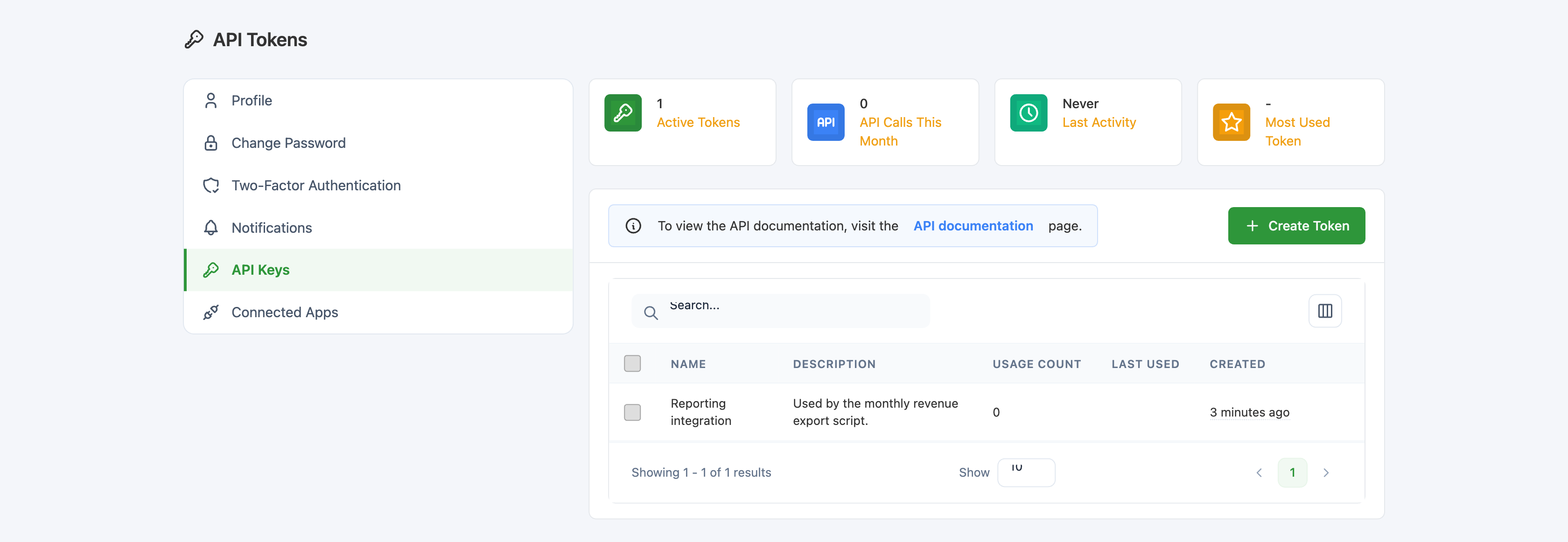
Sign in to SolidInvoice and open Settings → API Keys (or visit /profile/api directly). Click the green + Create Token button at the top right of the list.
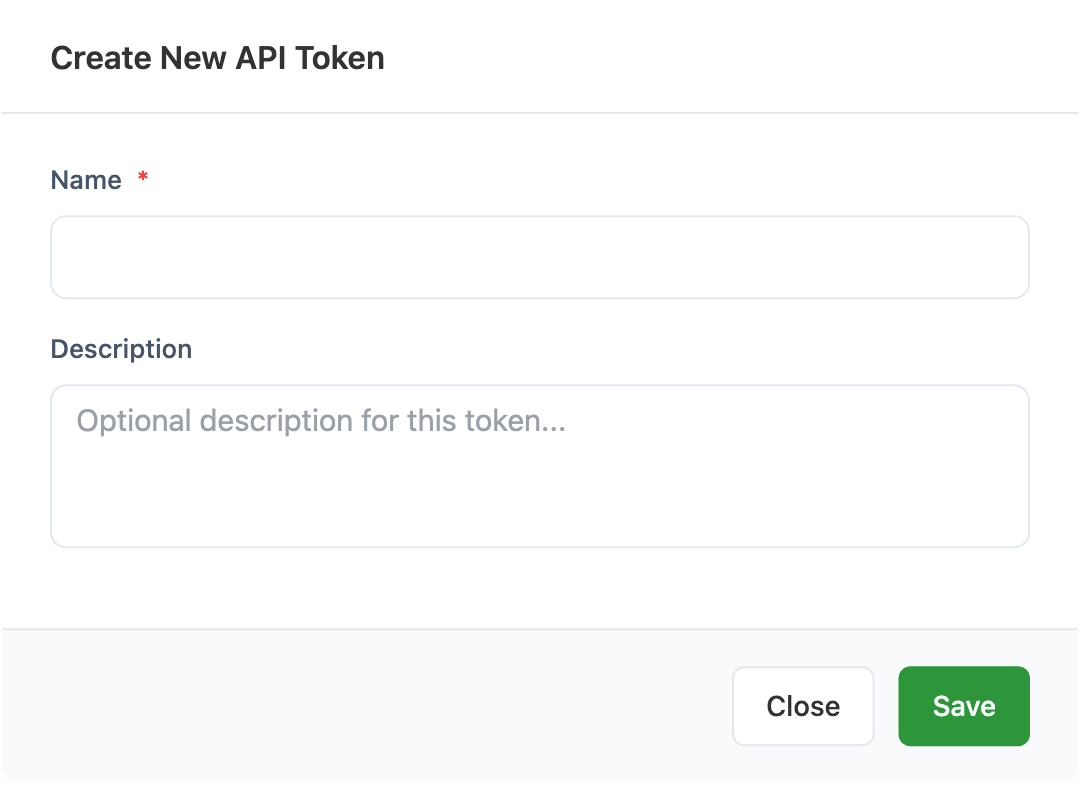
In the Create New API Token dialog, fill in:
Name(required) — a label for the token. Pick something that identifies where it will be used, e.g.Reporting integrationorZapier.Description(optional) — a longer note describing the token's purpose.
Click Save. The dialog updates to show the generated token value:
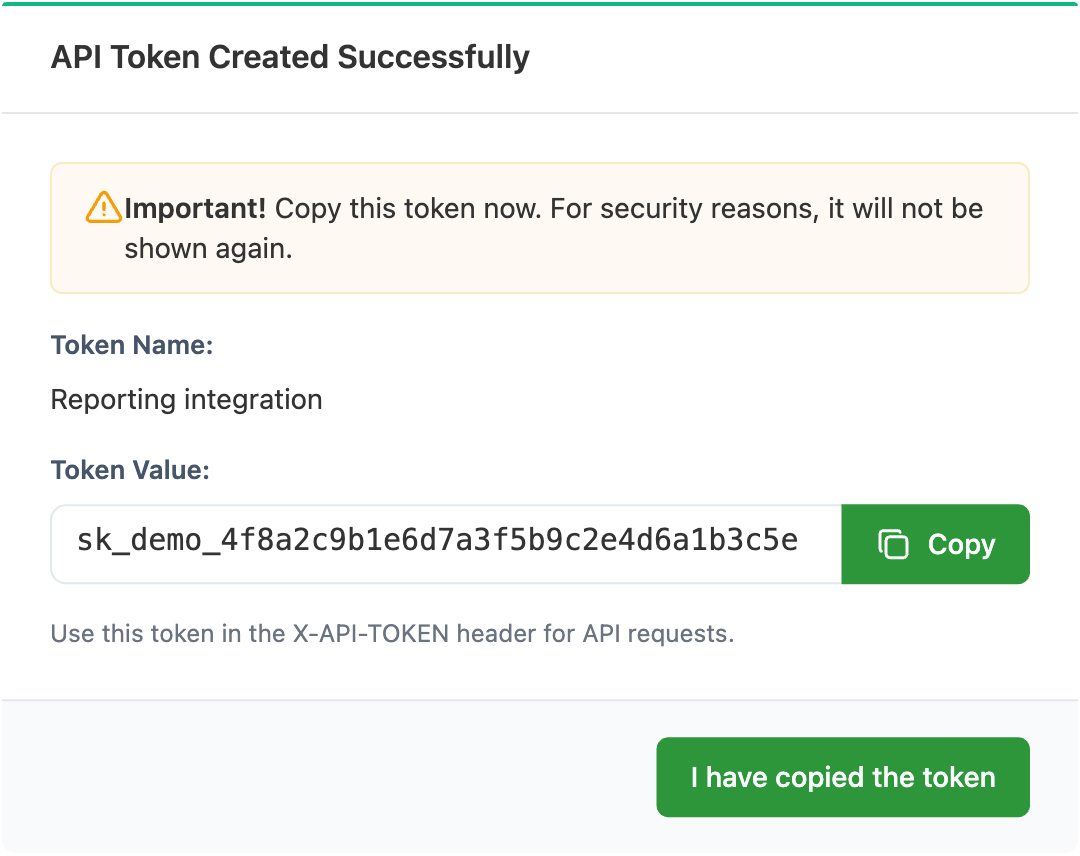
The token is shown only once, immediately after creation. Click the Copy button and store it in a password manager or your integration's secret store before clicking I have copied the token. If you lose it, revoke the token and create a new one — there is no way to retrieve the original value later.
Viewing your tokens
The token list shows everything you've created, with these columns:
Name,Description— what you entered when creating the token.Usage Count— total number of API requests made with this token.Last Used— when the token was last used to make a request, or empty if never used.Created— when the token was generated.
The four stat cards above the list summarise the same data across all your tokens: Active Tokens, API Calls This Month, Last Activity, and Most Used Token.
The list is searchable and sortable. The token value itself is never shown again after creation — only its name.
Viewing request history
Every successful API request authenticated with a token is recorded against that token. Click View History on a token's row in the list to open a modal with the captured requests.
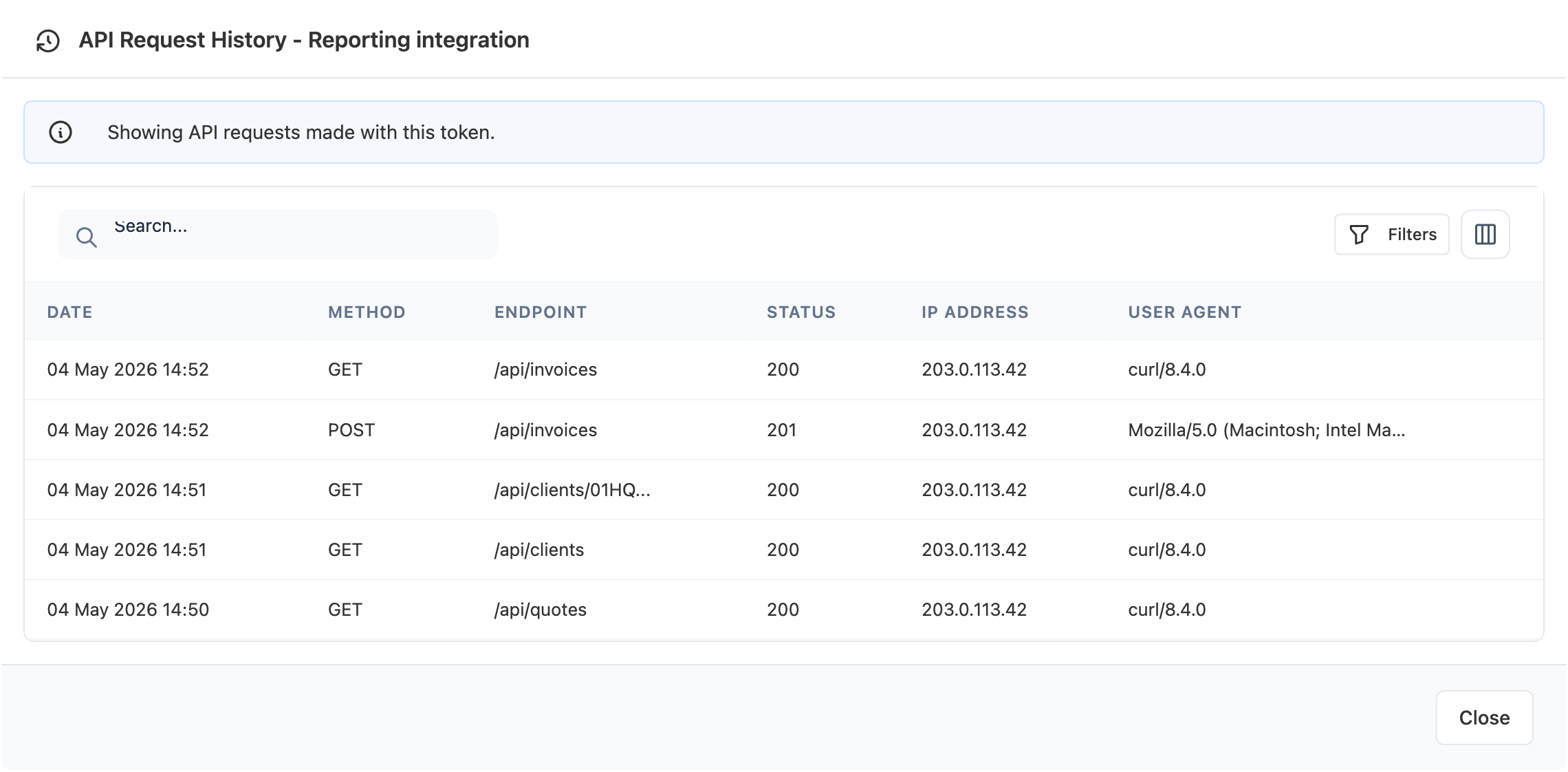
Each row records:
Date— when the request arrived.Method—GET,POST,PATCH,PUT, orDELETE.Endpoint— the path that was called (e.g./api/invoices).Status— the HTTP status code returned to the client.IP Address— the client's IP at the time of the request.User Agent— theUser-Agentheader sent by the client.
The history list is filterable by date range, method, and status range, and is capped at the 100 most recent entries displayed at a time. Failed authentication attempts (no token or wrong token) are not recorded — only successful ones.
Revoking a token
To revoke a token, tick its checkbox in the list, then choose Revoke from the batch-actions toolbar.
Revocation is immediate and there is no confirmation dialog. The token row is deleted along with its full request history. Any application using the revoked token will start receiving 401 Unauthorized on its next request — so plan to update integrations before you revoke.
If you need to rotate a token without downtime, create the new token first, switch your integration over to the new value, verify it's working (look for the new token's Last Used timestamp updating), and only then revoke the old token.
Authenticating requests
Send the token in the X-API-TOKEN HTTP header on every request:
curl -H "X-API-TOKEN: <your-token>" \
     -H "Accept: application/ld+json" \
     https://your-instance.example/api/invoices
The API is stateless — there is no session, no CSRF token, and no login round-trip. Send the header on every request. Tokens are scoped to one user and one company; if your account belongs to multiple companies, generate a separate token per company by switching companies in the UI before creating the token.
If a request lacks a valid token, the server responds with 401 Unauthorized and a JSON body:
{ "message": "No API token provided" }
Response formats
The API supports content negotiation via the Accept header. Available formats:
| Accept value | Format |
|---|---|
application/ld+json (default) | JSON-LD with Hydra hypermedia |
application/json | Plain JSON |
application/hal+json | HAL JSON |
application/vnd.api+json | JSON:API |
application/xml or text/xml | XML |
Collection endpoints are paginated with 30 items per page by default. Override with the itemsPerPage query parameter:
curl -H "X-API-TOKEN: <your-token>" \
     "https://your-instance.example/api/invoices?page=2&itemsPerPage=50"
Errors are returned in RFC 7807 application/problem+json format with a human-readable title, detail, and a machine-readable type.
Rate limits
The API is rate-limited to 300 requests per minute, using a sliding window. The bucket is keyed by token when authenticated, falling back to client IP for unauthenticated requests.
Every API response includes the current state of your bucket in the headers:
| Header | Meaning |
|---|---|
X-RateLimit-Limit | The total budget per window (300). |
X-RateLimit-Remaining | Requests left in the current window. |
X-RateLimit-Reset | Unix timestamp when the budget resets. |
If you exceed the limit, the response is 429 Too Many Requests with a Retry-After header and an application/problem+json body. Back off until Retry-After seconds have elapsed before retrying.
Endpoint reference
The interactive Swagger UI for your installation is the authoritative reference — it always reflects the exact resources and fields available on your version:
https://your-instance.example/api/docs
The same documentation for the latest public release is hosted at solidinvoice.app/api/docs.
The main resource roots are:
/api/invoicesand/api/recurring-invoices/api/quotes/api/clients,/api/contacts, and/api/addresses/api/payments/api/taxes/api/api-tokens(manage your own tokens via the API)
All resources support standard CRUD verbs: GET for collections and items, POST to create, PATCH to update, DELETE to remove. Monetary amounts are expressed in minor currency units (e.g. cents for USD), and the currency itself comes from the associated client.
Troubleshooting
401 Unauthorized on every request
The token is missing, mistyped, or has been revoked. Double-check the X-API-TOKEN header value against the original — leading or trailing whitespace and stray quote characters are common culprits when copying from terminals or password managers. If the token genuinely no longer works, generate a new one and update your integration.
429 Too Many Requests
You've exceeded 300 requests per minute. Look at the Retry-After header in the response and wait at least that many seconds before retrying. For high-volume integrations, batch requests where possible, cache read-heavy responses, and stagger requests across the rate-limit window rather than firing them in tight loops.
Authentication succeeds but the request is rejected with 403
The token is valid but the authenticated user lacks permission for the action you requested. Verify the user owns the resource (or has the right role on the company that owns it) and that the token was generated while that company was active in the UI.
Request history isn't recording your calls
Only successful authentication is recorded. If your requests are returning 401, they won't appear in View History even if they reach the server. Make at least one request that returns 2xx and refresh the history to confirm the token works.